Site documents: access on your cellphone
ConstruMD
Nov 5, 2026
All Posts
SHARE THIS POST
Published : November 5, 2026
An employee informs you of their vacation several weeks in advance. You take note, but then projects pile up and the schedule fills. When it's time to confirm a team, this leave can easily be forgotten if it remained in a conversation or a separate calendar.
The problem then arises from the gap between actual availability and the people your planning relies on.
Our resource planner makes absences visible at the very moment you are preparing assignments.
An empty space in the schedule can suggest that an employee is available. However, they may be on leave during this period.
In the ConstruMD planner, recorded absences appear in the worker's calendar. You can view them along with their commitments and avoid scheduling them during a period when they will not be available.
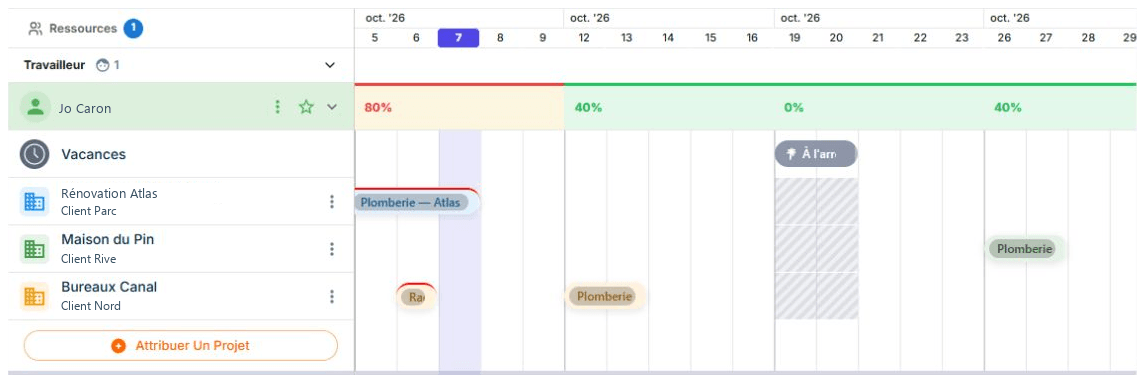
A known leave in advance gives you time to organize. You still need to see which tasks will need coverage.
The project calendar allows you to view the assignments planned during the absence. You can determine if another person needs to take over, if the team can be reorganized, or if certain dates need to be adjusted.
This way, you anticipate changes while there is still time to prepare and inform the concerned individuals.
An unforeseen absence requires quicker decision-making. The existing schedule helps you identify the affected tasks and consult the commitments of employees who might take over.
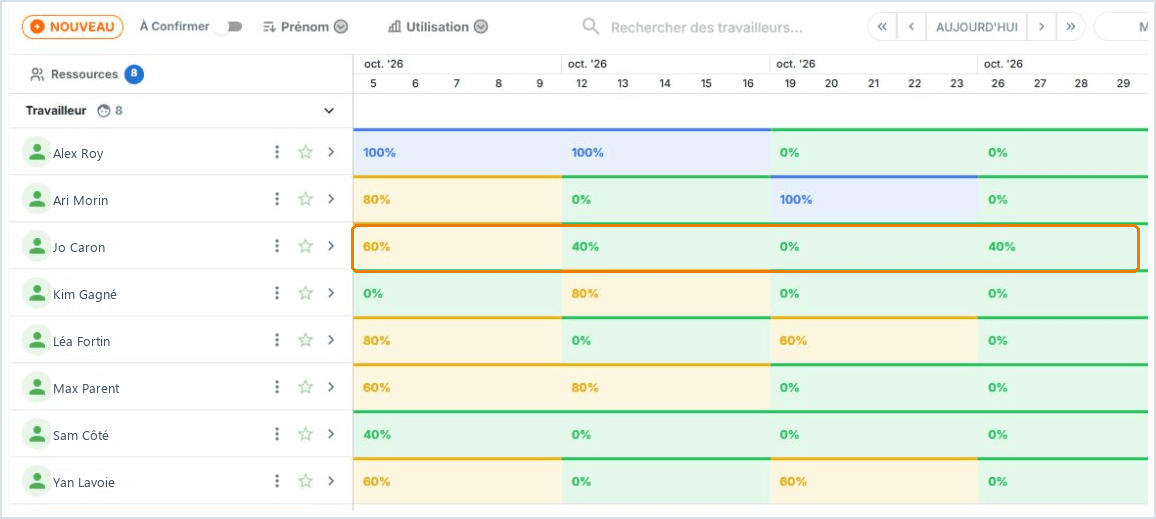
You can modify assignments according to the chosen solution, while ensuring that the replacement is not already booked elsewhere. This step helps avoid double booking during replacement.
By integrating absences into the schedule, you prepare your teams based on the people who can actually be present.
Try the ConstruMD planner for free for 7 days and keep leaves visible in your organization.
You might like
ConstruMD
Nov 5, 2026
ConstruMD
Nov 5, 2026

ConstruMD
Nov 5, 2026