Site documents: access on your cellphone
ConstruMD
Nov 5, 2026
All Posts
SHARE THIS POST
Published : November 5, 2026
When a machine breaks down, it's important to quickly determine where it was supposed to work. The next day's site often comes to mind first. However, another team might also be waiting for it later in the week.
In ConstruMD, the machine's record allows you to log its status and the reason for its downtime. The calendar shows its bookings by site. This gives you the necessary information to review the relevant interventions before confirming a transport or a date with the team.
The same machine can move from one site to another. Its repair therefore concerns the depot, but also the teams that planned to use it and the person organizing its transport. When this information is scattered, announcing the breakdown is not enough to identify all the commitments that need to be reviewed.
You can address the most urgent need without considering the next booking. The team then discovers the problem just as they are about to start work. They need to find another machine, contact the transporter, and decide which tasks can proceed in the meantime.
The time lost comes as much from this search as from the breakdown itself. To make a decision, you first need to reconstruct the machine's schedule and determine which sites actually need an alternative solution.
In ConstruMD, each machine has its own record. You can select the "Out of Service" condition and add a note describing the observed problem. The identifier distinguishes between two similar pieces of equipment: you know exactly which machine is being referred to.
In the demonstration, the record for MP-01 indicates a hydraulic leak and specifies that the mini-excavator is immobilized for diagnosis. The note also reminds you of the two sites whose bookings need to be reviewed before confirming transport.

Fictitious demonstration data. The identifier MP-01 and the "Out of Service" condition help recognize the immobilized machine.
The resource planner's calendar shows the machine's bookings with the projects they are linked to. By consulting the relevant dates, you can find the planned interventions, including the one following the most urgent need.
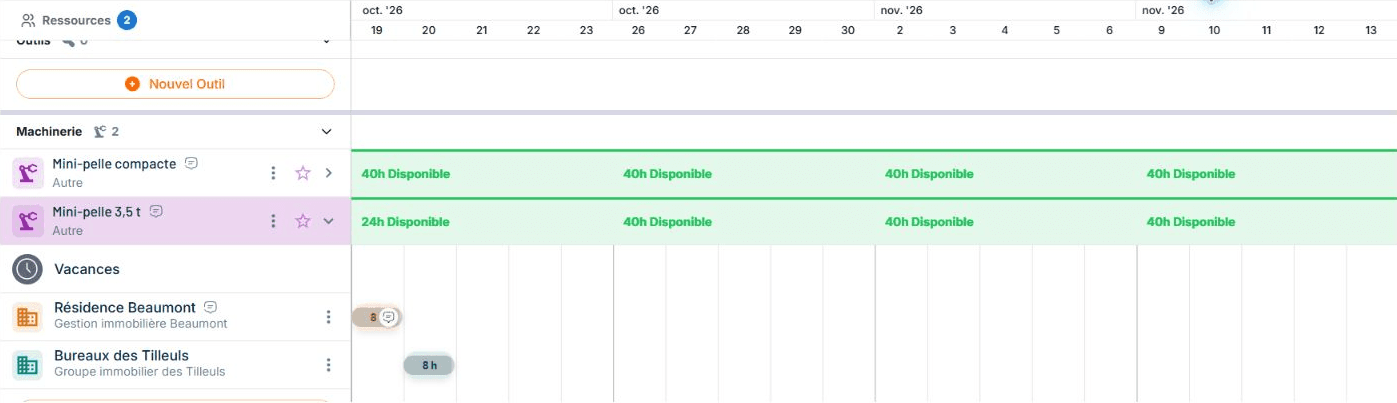
Fictitious demonstration data. MP-01 is scheduled on Residence Beaumont, then on Bureaux des Tilleuls. Both bookings need to be reviewed following its immobilization.
This view helps you decide the next steps for each site. Depending on the expected work, you can look for a replacement machine, reschedule the intervention, or revise the order of tasks with the team. You also ensure that the chosen equipment is suitable for the work and that its transport can be organized.
Once your choice is made, you record the booking on the chosen machine and remove the booking of the immobilized machine for the concerned site. In the demonstration, the employer booked MP-02 for Residence Beaumont, then deleted the previous booking of MP-01 on this site. The calendar thus reflects the replacement decided for this intervention.
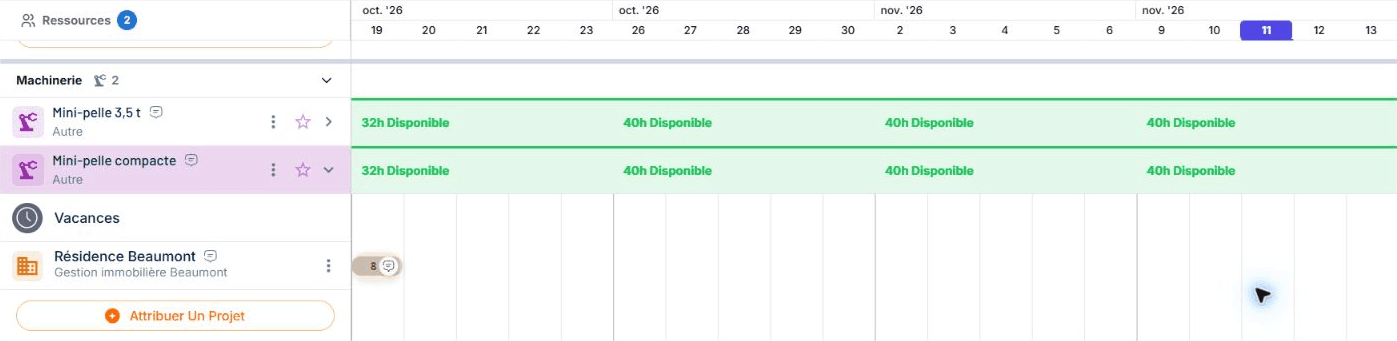
Fictitious demonstration data. MP-02 is now booked on Residence Beaumont on October 19. The corresponding booking of MP-01 has been removed by the employer; its intervention on October 20 on Bureaux des Tilleuls remains to be reviewed.
The need for Residence Beaumont is reorganized, but that of Bureaux des Tilleuls remains to be addressed. By reviewing the bookings one by one, you keep the next commitment in view while addressing the most urgent one.
The record explains why the machine is immobilized; the calendar helps find the interventions to review. You can then call the concerned parties with a specific request, rather than starting by searching where the equipment was supposed to go.
This follow-up complements the ConstruMD planner: the resources planned on your sites remain the starting point for your decisions, even when an unforeseen event forces a change in organization.
Try ConstruMD by adding a machine and its upcoming bookings. You will be able to find the sites to review if this equipment becomes unavailable.
You might like
ConstruMD
Nov 5, 2026
ConstruMD
Nov 5, 2026

ConstruMD
Nov 5, 2026