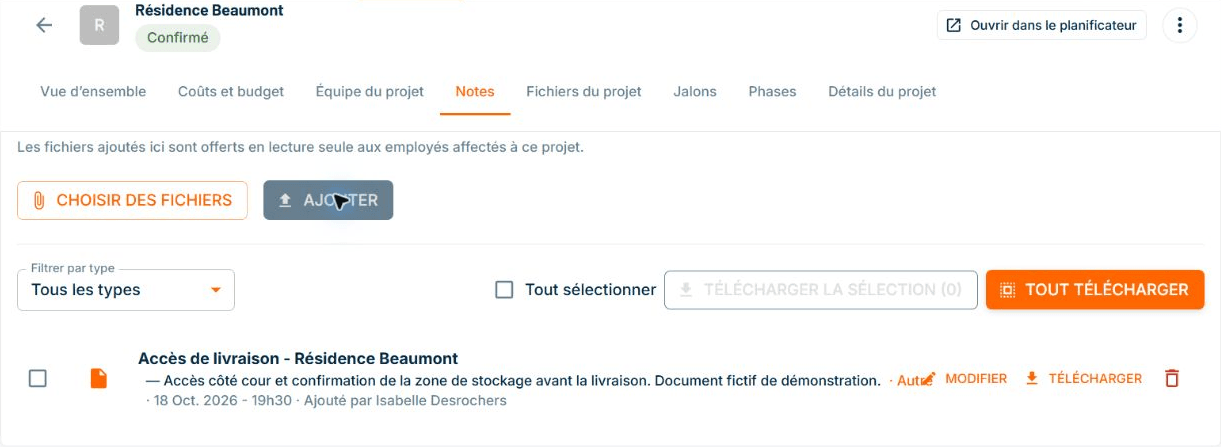
Site documents: access on your cellphone
ConstruMD
Nov 5, 2026
All Posts
SHARE THIS POST
Published : November 5, 2026
An employee scheduled on a single project can still have an overloaded week. The periods do not overlap, but the total scheduled hours exceed the available hours in their week.
To plan the workload on your projects, you need to look at the hours as well as the dates. The ConstruMD planner calculates the expected utilization of employees in the calendar. You can spot an overloaded week, review the periods that make it up, and reorganize before announcing the schedule.
When you prepare a project, you estimate the days needed to complete the work. If the deadline is tight, it may be tempting to fit the entire intervention into the available week by increasing the scheduled hours per day.
The work is placed in the desired week, but the scheduled hours exceed the employee's capacity. The same problem can occur when several interventions follow one another: each seems short, yet their hours add up for the same employee.
If you discover this discrepancy once the work has started, you need to find reinforcement, review priorities, or announce another end date to the client. The decisions also affect other employees and the projects where you planned to send them. Checking the load before confirming the schedule gives you time to choose the adjustment.
In the Resources view of our planner, the Utilization display shows the scheduled load as a percentage. By opening an employee, you can find their assignments under the relevant projects.
To prepare each work period, you indicate its start, the number of workdays, and the scheduled hours per day. The resource planner calculates the total hours for the period and updates the utilization displayed in the calendar.
In our demonstration, the fictional worker Mathieu Fortin has a displayed capacity of 40 hours per week. A single assignment of five days at ten hours per day represents 50 scheduled hours. His utilization thus reaches 125% for the week of November 2.
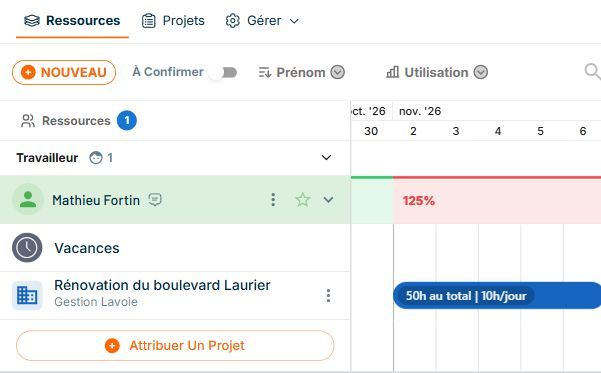
Demonstration data. The 125% rate appears in red above the only scheduled assignment from November 2 to 6.
This reading highlights the problem even without double booking. The 50 hours are all placed within the week, but they exceed the displayed capacity by ten hours. You know which period to review before finalizing this organization.
If you are planning multiple projects, check the different assignments of the employee to understand where their hours come from. For overlapping periods, our article on double assignments completes this verification.
Identifying an overload does not change the work to be done. If you maintain your estimate, you still need to schedule all those hours to complete the work. You must therefore review the dates or the people who will handle it.
In the demonstration, we kept the 50 hours and changed their distribution. The first period covers five days at eight hours, or 40 hours from November 2 to 6. A second period schedules the remaining ten hours on November 9 and 10, at five hours per day.
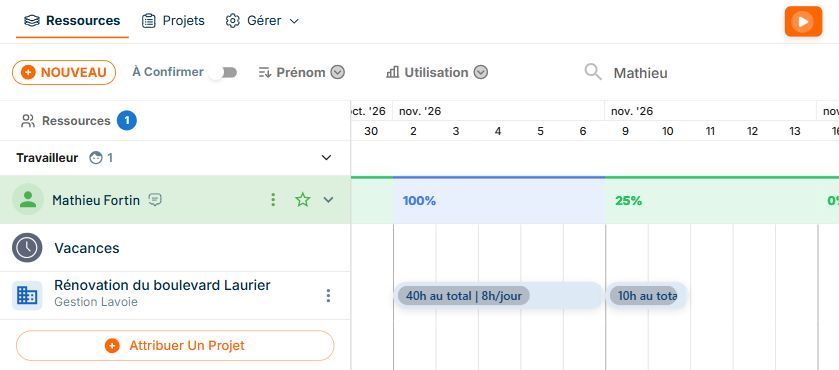
Demonstration data. The same 50 hours are distributed over two periods: 40 hours, then 10 hours. The calendar now shows 100% utilization the first week and 25% the next.
The ConstruMD planner recalculates the totals and percentages after the modification. However, the end of the intervention shifts from November 6 to 10. You can thus examine the load and the new end date together, before agreeing on the schedule with the client and the team.
Spreading the hours is suitable when the work and the deadline allow it. If the end date must remain the same, you can instead check the availability of another employee and determine which part of the work they could take on. Their skills and commitments on other projects count in this decision.
The distribution of employees across multiple projects helps prepare this type of adjustment. After modifying the assignments, review the weeks of the people involved to see how their hours are distributed.
The utilization percentage gives you a benchmark for decision-making. A week at 100% corresponds to the fully planned displayed capacity; also plan the margin you deem necessary to absorb a change or an extended intervention.
You can then confirm the planned people and work dates considering the load you assign them. Changes in duration or personnel are reviewed during preparation, when you can still discuss them with the teams and clients involved.
Try our planner for free for seven days, without a credit card, to check your employees' load before confirming their next project week.
You might like
ConstruMD
Nov 5, 2026
ConstruMD
Nov 5, 2026

ConstruMD
Nov 5, 2026