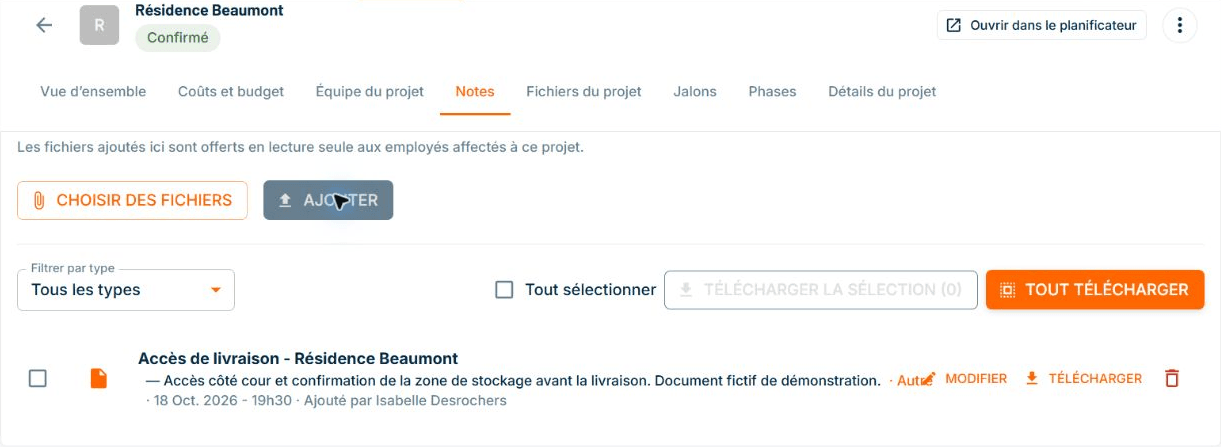
Site documents: access on your cellphone
ConstruMD
Nov 5, 2026
All Posts
SHARE THIS POST
Published : November 5, 2026
Finding a saw, a laser, or another valuable tool shouldn't require calling the entire team. When equipment circulates between multiple sites, you need to know where its use is planned, until when, and where it should go next.
Planning construction site equipment also helps prepare for its retrieval. A tool forgotten at the end of the work can lead to an additional trip. If it becomes untraceable, you may have to replace it or rent equipment to continue the work.
The ConstruMD planner brings together tools, sites, and work periods in the same calendar. You can find the assignment of equipment, verify that it is scheduled for the necessary days, and organize the next steps with the people involved.
The problem often starts with information that remains in messages or in employees' memories. A tool goes to a site, its use is extended, then another team needs it. To prepare for its transfer, you must first piece together what was agreed upon.
The consequences are felt at several moments. Before the work, you make multiple calls to find the right equipment. During the intervention, a team may wait if the tool was retrieved too early. At the end, the departure of employees can be organized without the equipment's departure being organized as well.
The challenge is therefore to prepare the entire journey of the tool: its use on the site, its retrieval, and its next assignment.
In the Resources view of our planner, open the list of tools, then the one you are looking for. You can view the projects to which it is assigned. The calendar shows its period of use under the corresponding site.
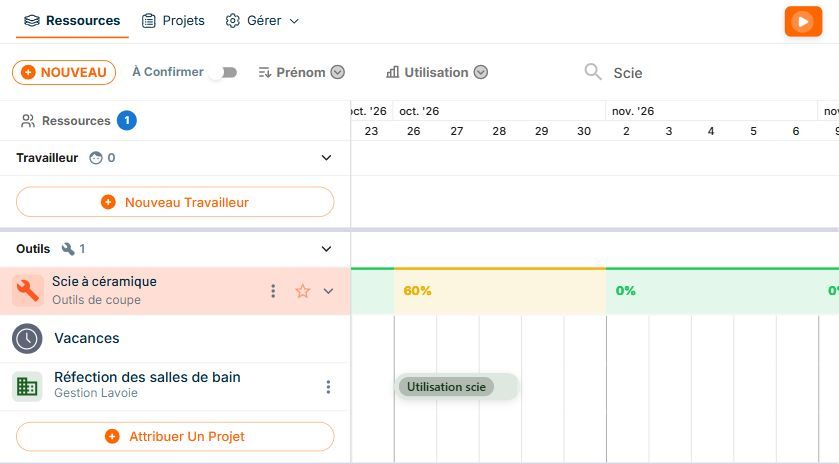
Demonstration data. Under the ceramic saw, the calendar displays the Bathroom Renovation site and its scheduled use from October 26 to 28.
This gives you a precise starting point to find the equipment. If you need to confirm where the saw is before retrieving it, you can contact the people at the indicated site. You avoid starting by asking all employees if they know where it has gone.
For your valuable tools, keeping assignments up to date allows you to keep this information accessible. If the tool is scheduled on another site or on different dates, update its assignment.
Knowing which site a tool is scheduled for solves the first part of the problem. You also need to check that it is scheduled long enough. A day added to the employees' schedule may extend their need for equipment.
In the Projects view of the resource planner, the periods of employees and tools appear under the same site. For each, you specify the start date, the number of days, and the hours planned per day.
To understand the verification, here are the demonstration dates before adjusting the saw.
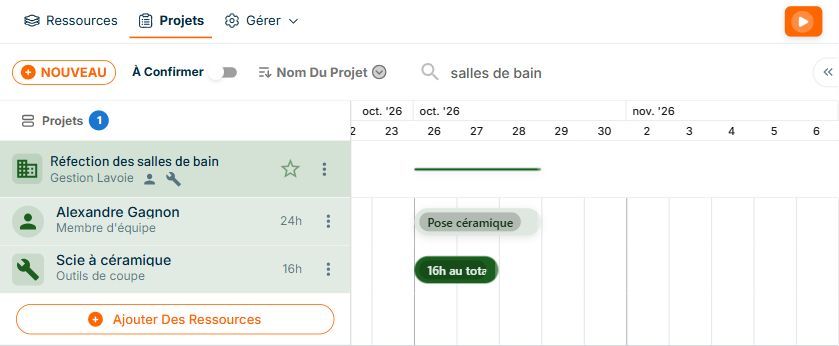
Demonstration data. The fictitious worker Alexandre Gagnon is scheduled until October 28, while the use of the saw ends on the 27th.
Both periods start on the same day but end on different dates. If the employee still needs the saw on the 28th, a retrieval scheduled for the 27th would be too early. You can spot this discrepancy before communicating the dates to the team.
You then adjust the duration of the tool's use. The ConstruMD planner displays the new dates and recalculates the planned hours.
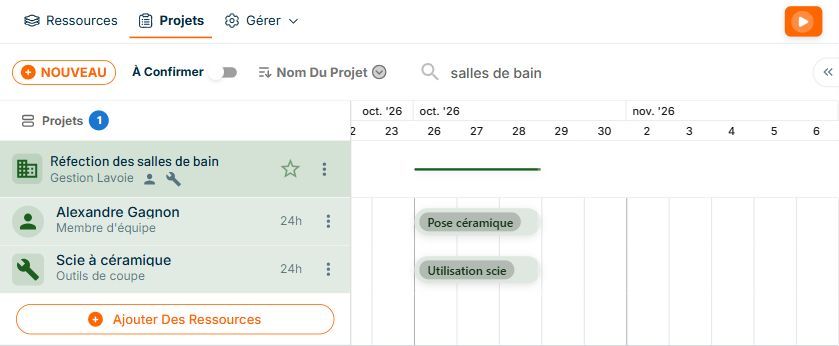
Demonstration data. The use of the saw has been extended until October 28. The employee's dates remained unchanged.
The work to be done guides your decision. If a tool is used throughout the intervention, its period can match that of the employees. If it is used for a single stage, you give it the dates of that stage.
The scheduled end date for the tool is then used to organize its retrieval. Before the team leaves the site, check the tools assigned there and agree on which ones should return, when they will be retrieved, and who will handle it.
This verification gives a place to the equipment in the preparation for departure. A saw used at the beginning of the work may have been stored for several days; it still needs to be retrieved. Comparing the tools scheduled at the site with those the team brings back helps spot a forgotten item while it is still possible to correct it.
Spotting a forgotten item before the team leaves gives you time to retrieve the tool on-site. This limits the risk of an additional trip or an expense to replace equipment that has become untraceable. It's also a way to preserve the equipment you have already purchased.
Once the end of use is known, you can prepare the next site that will need the tool. Check its assignments, confirm its retrieval with the concerned team, then plan its use on the next project.
The calendar gives you the dates to coordinate. You can arrange the transport and the moment when the other team will receive the equipment before their intervention. If multiple sites need it, our article on double assignments completes this verification.
You prepare the next move knowing which site to contact to confirm the retrieval. The calls then serve to organize the tool's transfer to the next team, instead of starting by searching for it among all employees.
The presentation of the ConstruMD planner explains how to bring your teams and resources together in the calendar.
Try our planner for free for seven days, without a credit card, to prepare the use of your tools and organize their transfer from one site to another.
You might like
ConstruMD
Nov 5, 2026
ConstruMD
Nov 5, 2026

ConstruMD
Nov 5, 2026