Site documents: access on your cellphone
ConstruMD
Nov 5, 2026
All Posts
SHARE THIS POST
Published : November 5, 2026
An intervention that starts on Thursday does not necessarily end on Friday. If you prepare Monday's departures without checking the days still scheduled on ongoing projects, you might assign an employee elsewhere when they need to finish their work first.
The key point to check before giving the next date is the last scheduled workday, even if it falls in the following week. This allows you to see until when the employee is already scheduled on the project.
The duration of work is often estimated in days, while the schedule is prepared one week at a time. When an intervention starts on Thursday or Friday, the last workday may fall in the following week.
For an employee who works Monday to Friday, Saturday and Sunday are not counted among their workdays. The remaining days must be scheduled after the weekend. If you only consider the start date and the number of days, this transition from one week to the next can be overlooked when preparing upcoming projects.
When an employee is expected on a new project on Monday while they still have a scheduled day elsewhere, both commitments become difficult to meet. You must decide which work will be rescheduled or check if another employee can take over.
This leads to calls to the client, instructions to correct, and sometimes a new distribution on other projects. The estimated duration may be correct: it is its transition into the following week that was forgotten.
The ConstruMD resource planner allows you to prepare an intervention with its workdays and then see the corresponding dates on the calendar. You can check its last day while organizing the next departures.
The assignment is prepared with a start date, a number of Workdays, and the planned hours per day in Effort/Day. The ConstruMD planner calculates the total hours and displays the start and end of the period on the Calendar line.
In the verified demonstration below, Camille Desjardins works Monday to Friday, eight hours a day. Three days of "Wall installation" are scheduled at the Pavillon des Érables starting Thursday, October 29. The displayed period extends to Monday, November 2: this is the date to consider for preparing her next project.
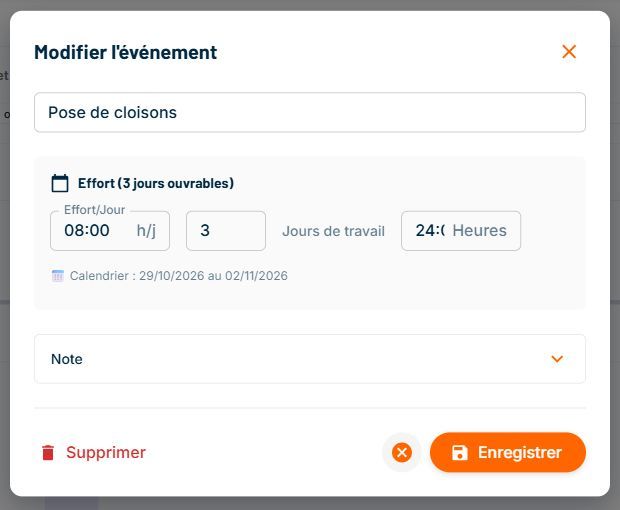
Demonstration data. The "Wall installation" period includes three workdays at eight hours per day. The Calendar line shows October 29 to November 2, 2026: the last day falls on Monday.
The three days represent 24 hours of work for Camille, spread over two weeks on the calendar.
Once recorded, the intervention appears on the calendar with its workdays. The Week view, with weekends displayed, allows you to see the end of the first week and the start of the next together.

Demonstration data. Under Camille Desjardins, the blue period covers Thursday and Friday, then resumes on Monday, November 2. The shaded columns of October 31 and November 1 help identify the weekend between these days.
To prepare the week's schedule, you can compare the end of previously started interventions with the employee's other commitments.
You then choose the date of the next project based on these periods and the work to be done. The duration estimate remains your decision; the calendar shows you the days this duration represents in the prepared schedule.
This way, you have a schedule that covers the end of ongoing work and the next departures, to prepare instructions before communicating them to the team.
Try our planner for free for seven days, without a credit card, and prepare an intervention that spans the weekend to check its last day before confirming the next project.
You might like
ConstruMD
Nov 5, 2026
ConstruMD
Nov 5, 2026

ConstruMD
Nov 5, 2026