Site documents: access on your cellphone
ConstruMD
Nov 5, 2026
All Posts
SHARE THIS POST
Published : November 5, 2026
A team arrives at a construction site, but the area where they need to work is not ready. Preparation is still ongoing. The employees wait, you look for work to give them, and the planned day needs to be reorganized.
To avoid this mismatch, the date of their arrival must consider two things: the work that precedes them and their commitments on other sites. Seeing this information in the same calendar helps you choose a date before the team moves.
The problem often starts with a date chosen based on the availability of employees. This day fits their schedule, so it is reserved for the next intervention. But the time needed to prepare their area was estimated separately.
Both decisions seem reasonable when looked at individually. It is by bringing the dates together that one can see that the finishing starts during the last day still planned for preparation.
If this mismatch is discovered upon the employees' arrival, a decision must be made about what to have them do, check if another site can accommodate them, and modify the instructions. If they have to leave, the work requires a new trip and another slot in their schedule. A poorly chosen date thus leads to corrections far beyond the concerned site.
The ConstruMD resource planner displays the workers' periods under the same site in the Projects view. You see the days planned for preparation and for the next intervention. Their start and end dates can be compared before confirming the employees' arrival.
To get this view, you associate the people with the site and record their periods with a start date, a number of workdays, and the hours planned per day. A title like "Preparation" or "Finishing" allows you to recognize the planned work.
In the demonstration below, preparation takes place on December 7, 8, and 9. Finishing starts on the 9th and continues on the 10th. The last day of preparation thus coincides with the first day of finishing.
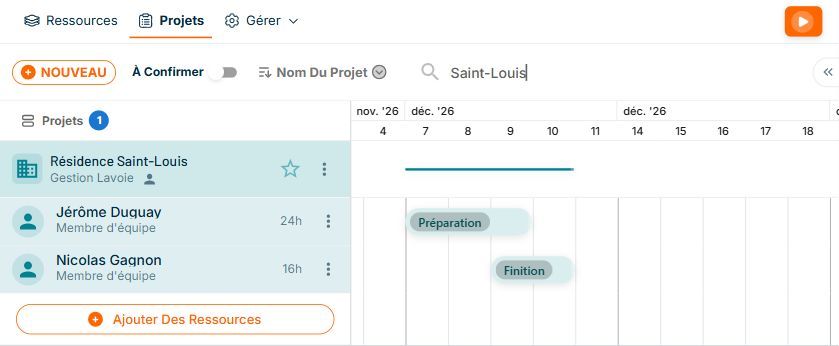
Demonstration data. Finishing starts on December 9, while this day is still planned for preparation. Both periods are visible under the same site.
This comparison makes a date to be reviewed visible. In this demonstration, preparation must be completed before finishing. On your site, you determine with the teams what needs to be ready and what can be done in parallel, in different areas.
Our planner allows you to move the work period. Here, finishing is rescheduled for December 10 and 11. It retains its two days, while preparation keeps its initial dates.
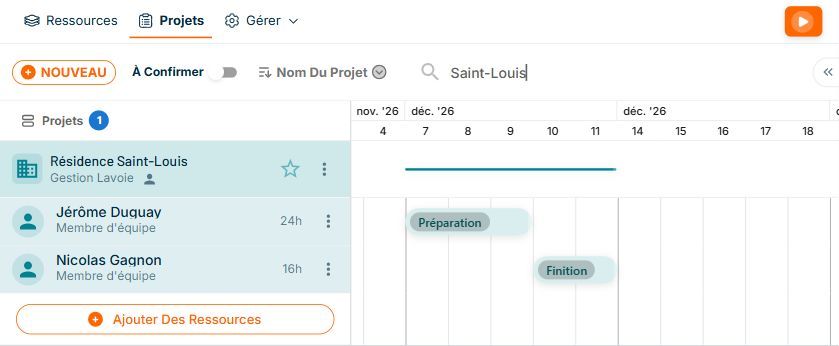
Demonstration data. Preparation is scheduled until December 9. Finishing is now placed on the 10th and 11th, with its two workdays retained.
The calendar now shows the chosen sequence: preparation until the 9th, then finishing starting on the 10th. You can explain this proposal to the teams and check the necessary conditions on-site, such as access to the area, materials, or a delay between tasks.
Postponing an intervention can resolve the sequence on this site while creating a problem elsewhere. The new day must also suit the people who will do the work.
The Resources view of the ConstruMD planner groups projects under each worker. You find their other assignments in the same schedule and can compare them to the considered period. The decision thus takes into account the order of tasks and the employee's commitments.
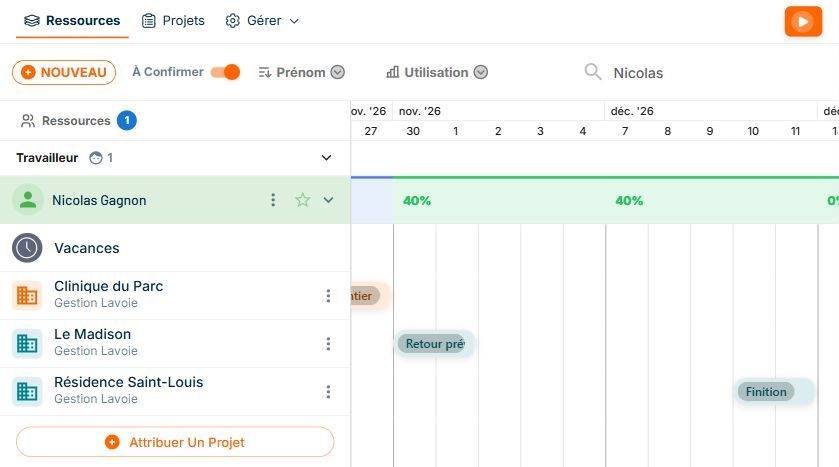
Demonstration data. Under "Nicolas Gagnon," the previous site is scheduled for November 30 and December 1. The finishing of the new project appears on December 10 and 11. Both sites are visible in the same worker's schedule.
In this example, Nicolas Gagnon's previous assignment does not overlap with the days chosen for finishing. If these days were already reserved for another project, you could choose another period or review the distribution of employees across multiple sites.
The sequence can be reviewed during planning, while the dates can still be discussed. You agree with the teams on what the first one must complete, what needs to be ready, and the day the next one is expected. The announced date is based on the planned periods and the workers' commitments.
If preparation then extends, this same information allows you to review assignments and prepare for the resumption. You can organize the next visit before sending employees on-site to discover they have to wait.
Try the ConstruMD planner for free for seven days and check the sequence of interventions before confirming the arrival of your next team.
You might like
ConstruMD
Nov 5, 2026
ConstruMD
Nov 5, 2026

ConstruMD
Nov 5, 2026