Site documents: access on your cellphone
ConstruMD
Nov 5, 2026
All Posts
SHARE THIS POST
Published : November 5, 2026
A budget may seem sufficient when part of it must already cover a delivery of materials or another planned expense. If these amounts are separate from the cost of the teams, you risk confirming the next work by overestimating what remains to complete it.
Before approving a new expense, ensure that the amounts already planned are accounted for in the budget you are reviewing. A known delivery is part of this verification, just like the hours reserved for employees.
Work hours are prepared in the schedule. The price of a delivery is found in an email from the supplier. Another expense was noted during a call. You have the necessary information, but it is not all gathered in the project tracking.
The remaining amount can then be calculated mainly from the planned labour. Other costs must still be found and added to the calculation, even if they are already known when you are preparing the next work.
The problem becomes concrete when you need to approve another order or plan an additional intervention. The budget seems sufficient, but part of the amount must already cover expenses left elsewhere.
To verify what you can still commit, you need to find the prices, reread the notes, and redo the calculations. If a new expense has already been confirmed, you must review your forecasts and decide which work or purchases can still be committed.
The ConstruMD resource planner allows you to attach expenses to the project file and include them in its budget. The Costs and Budget section then gathers the costs of planned resources and the expenses you have added. The Total Committed and the Remaining Budget are recalculated from this information.
The planned labour costs on the project come from assignments and configured hourly rates. By adding other expenses to the same tracking, you can examine the remaining amount with the different costs already planned for the project.
For a delivery, open the project file in Manage → Projects, then add it under Other Expenses with a clear description and its amount. The Include in Budget option determines if this expense is included in the project calculations. Once recorded with this option activated, it appears in the list and the budget amounts are updated.
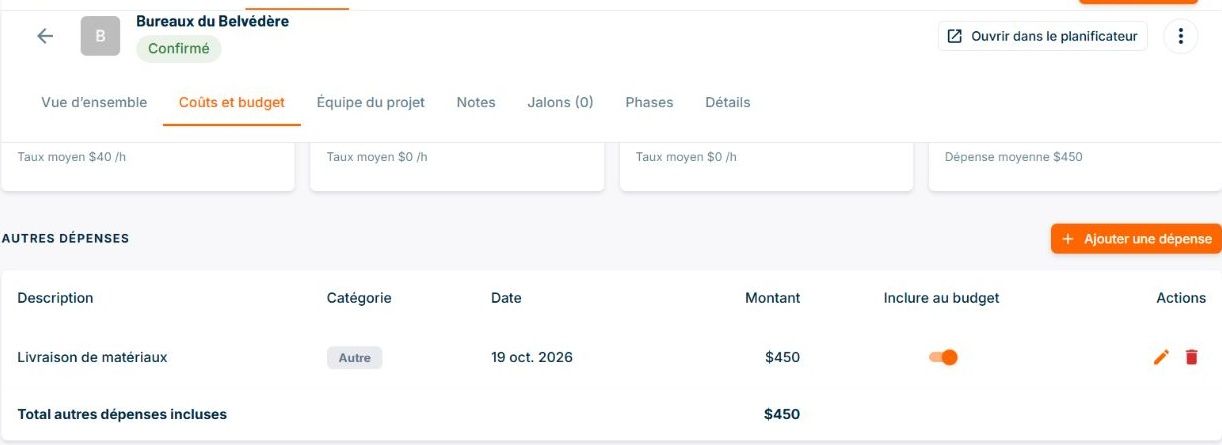
Demonstration data. The delivery is linked to the "Belvédère Offices" project. The orange button in the Include in Budget column is activated and the total of other included expenses shows 450$.
In the verified demonstration below, the Belvédère Offices project has a budget of 5,000$. The assignments represent 640$ of planned labour. Before adding the delivery, the remaining budget shows 4,360$.
Once the 450$ delivery is included, the Total Committed rises to 1,090$ and the Remaining Budget to 3,910$. This latter amount now serves as a reference for preparing the future: the delivery is already accounted for.
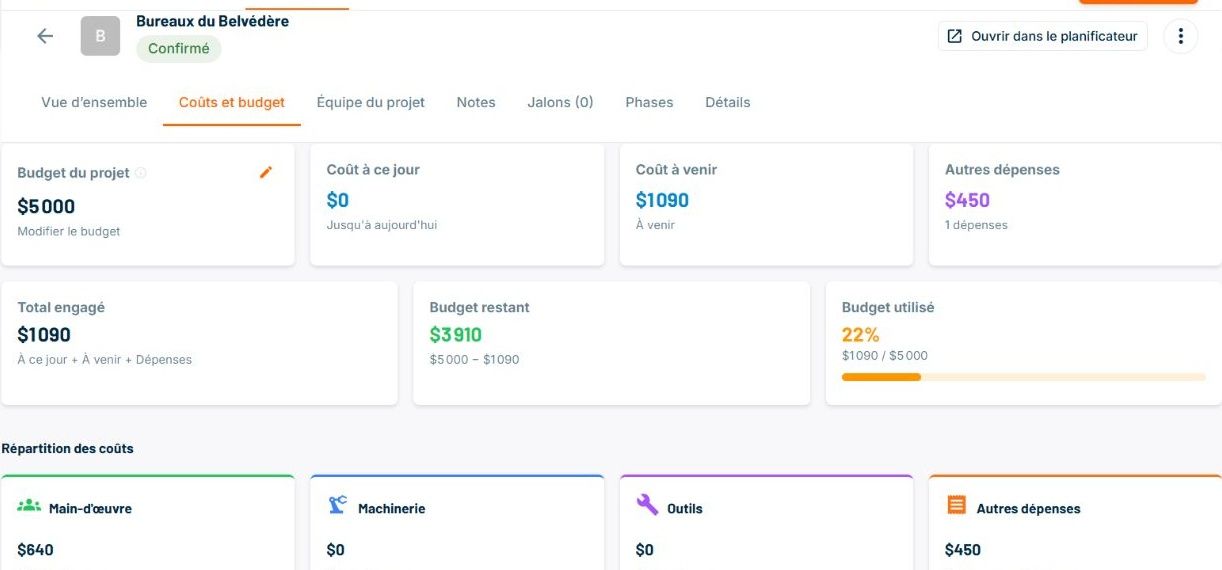
Demonstration data. The breakdown distinguishes the 640$ of labour and the 450$ of other expenses. The Total Committed gathers them; the Remaining Budget shows the difference with the 5,000$ recorded for the project.
The Other Expenses line details the 450$ delivery already included in the Total Committed.
Before approving another expense, you can review the amounts recorded for the project and compare the remaining budget to what you want to add. You can then confirm the expense or review the order with the supplier if its amount exceeds the remaining budget.
If the supplier changes the delivery price, the recorded expense can be modified in the project file. Our planner recalculates the amounts after recording; you find a remaining budget that takes the new price into account.
You thus prepare the next commitments from tracking that gathers already known costs, instead of redoing the search in emails and notes for each decision.
Try our planner for free for seven days, no credit card required. Add the planned expenses of your next project to check the remaining amount before committing to the next work.
You might like
ConstruMD
Nov 5, 2026
ConstruMD
Nov 5, 2026

ConstruMD
Nov 5, 2026